





































How To Use The Site
Here's a quick guide to how to use our site!
The orange navigation bar at the top of the page looks like this:
.jpg)
“Search” will let you search for other users. You can set whatever parameters you want (age, location, online now, etc). Clicking “More options” will give you additional parameters (role, implements, experience level, etc).
“Like Me” will show you users who liked your profile. You can use the Tinder-style buttons to indicate if you like them back.
“Chats” has all of your chats with other users.
“Events” shows you our calendar of spanking events all over the world. You can click “Create an Event” to make one of your own, or use the search tools on the right hand side of the screen to search for events.
Clicking your image in the right upper corner opens up your profile. You can post thoughts to your wall or click “Profile” to change any of your profile information. You can also select add-ons here. Add-ons are paid features that bring more attention to your profile.
When you click profile, you'll see something that looks like this:
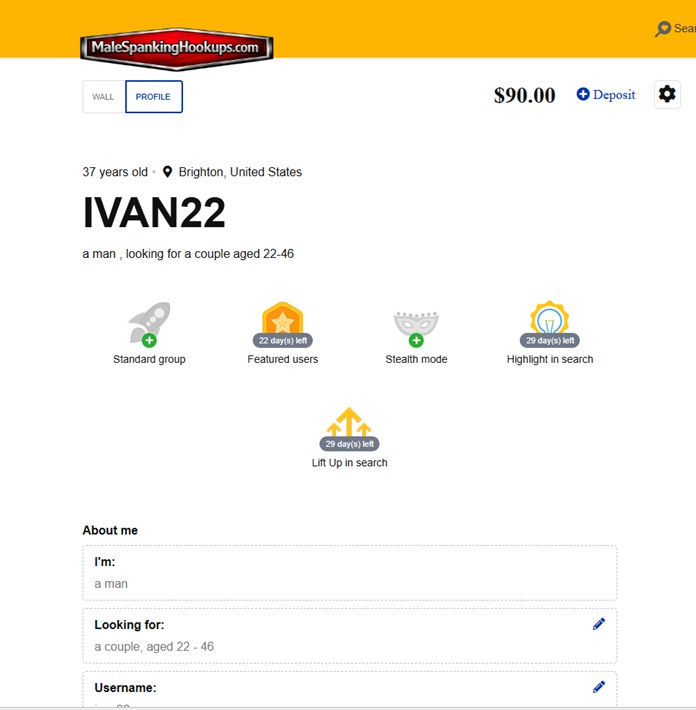
Clicking “ + Deposit” will let you add funds to your account to purchase add-ons or Premium memberships.
Clicking the gear symbol will let you change your password, email address, manage you blacklist, and delete your account.
Add-Ons:
Group: Standard (Free) or Premium (Paid)
Featured Users: Get your profile picture listed at the top of the page, giving you amazing exposure to our community!
Stealth Mode: No one will be able to search for your profile, nor will anyone see that you looked at their profile. Perfect if you want to take a break without deleting your account.
Highlight in Search: This will outline your profile picture in neon green on the search results page, drawing more attention to your profile and bringing you more viewers.
Lift up in Search: Gets your profile listed first in any search results page when people search for users like you.
Questions? Comments? Complaints? Feedback? Compliments? Let us know!